Deploy to Nife without leaving VS Code
The Nife CLI Extension puts your full deployment workflow inside the editor. Deploy, stream logs, manage secrets, and configure apps — all from the Command Palette.
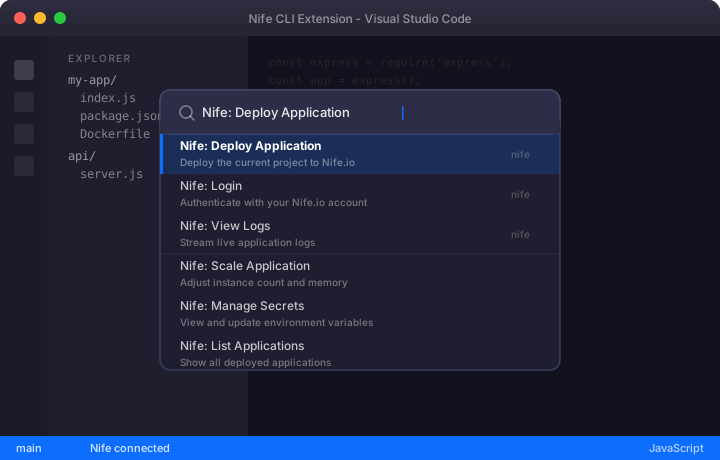
Your full deployment surface, inside the editor
No more alt-tabbing to a terminal. Everything nifectl can do, the extension can do — with the discoverability of the Command Palette.
Login without leaving the editor
Authenticate with your Nife.io account directly from VS Code — no browser tab, no separate login flow.
Full app lifecycle from the palette
Create, deploy, list, scale, and tear down applications using Ctrl+Shift+P — no terminal required.
Logs and metrics, streamed live
Tail application logs and view health metrics in a dedicated VS Code output channel — right where you're debugging.
Manage secrets without switching context
Set, update, and list environment variables and secrets from inside the editor.
Every nifectl command, one shortcut away
Every deployment action is one keystroke away. Open the Command Palette, type "Nife" and go — no flags to memorise, no man pages to check.
Clean, persistent output channel
Command results go to a dedicated Nife output channel — no noise in your terminal, always visible when you need it.
Up and running in under a minute
No CLI setup needed to install. Find it, click it, deploy.
Open Extensions
In VS Code, click the Extensions icon in the Activity Bar or press Ctrl+Shift+X (⌘+Shift+X on Mac).
Search "Nife CLI Extension"
Type "Nife CLI Extension" in the search bar. Look for the extension published by Nifelabs.
Click Install
Hit Install. The extension activates immediately — no restart needed.
Open the Command Palette
Press Ctrl+Shift+P (⌘+Shift+P), type "Nife" and run Nife: Login to connect your account.
Start deploying
You're ready. Use the Command Palette to create apps, stream logs, manage secrets, and more.
Also installable from the VS Code Marketplace website
Install now →Ship faster. Stay in flow.
Free to install. Works with any Nife.io account. Your existing nifectl workflows — now without the context switching.
This website uses cookies to improve your experience. By clicking "I Agree," you consent to our use of cookies. Privacy Policy